
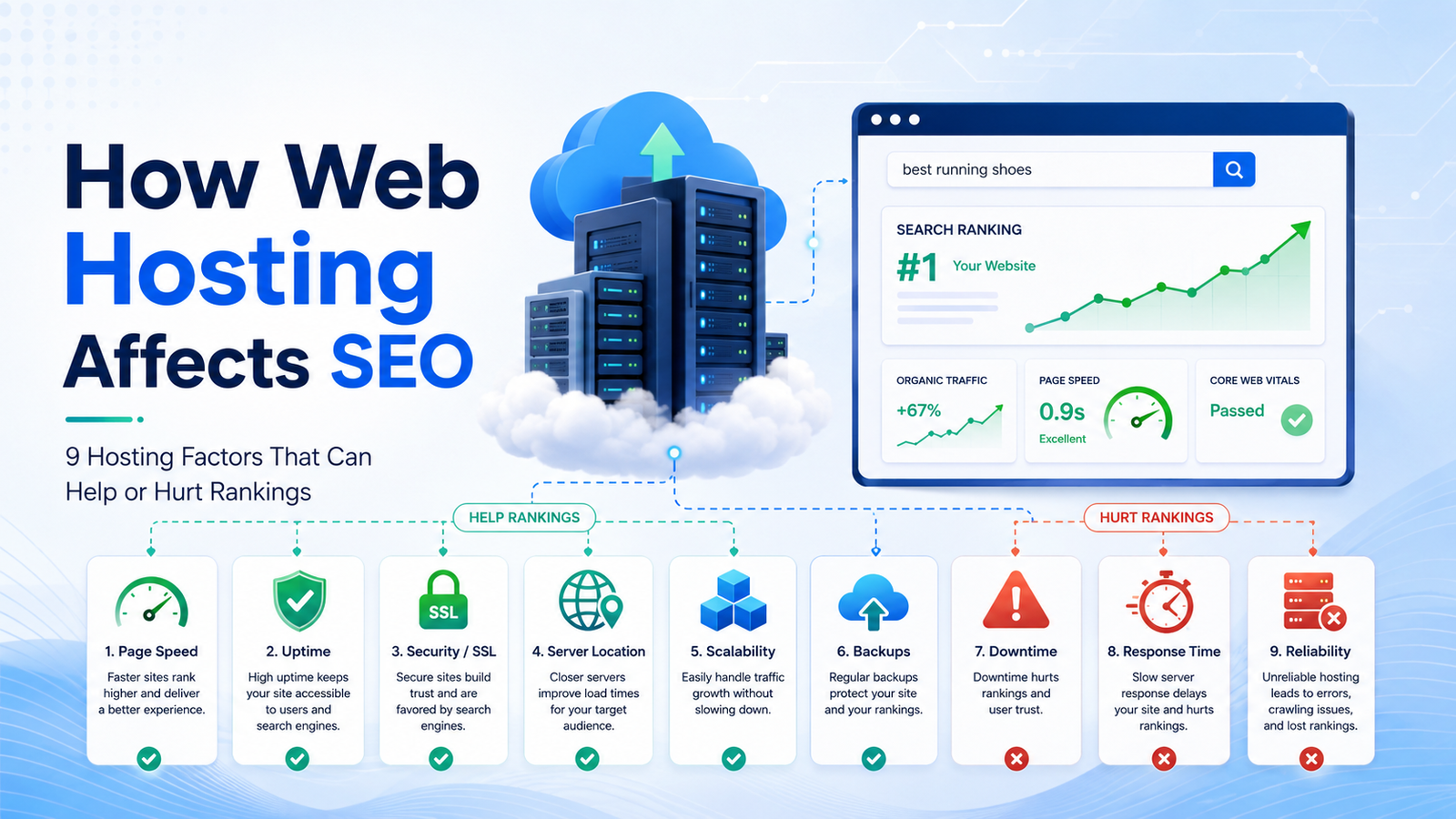
How Web Hosting Affects SEO: 9 Hosting Factors That Can Help or Hurt Rankings
A business can publish useful content, earn relevant backlinks, and optimize every title tag yet still struggle when its website is slow, unavailable, or unable to handle traffic.
Web hosting is not a substitute for a complete SEO strategy. Moving a weak website to an expensive server will not automatically move it to the top of Google. However, hosting can influence several conditions that affect organic performance, including page speed, crawl accessibility, server errors, security, scalability, and user experience.
Google explains that its ranking systems consider multiple aspects of page experience rather than relying on one universal “page experience score.” Core Web Vitals are used by Google’s ranking systems, but excellent performance scores alone do not guarantee high rankings. Relevance and content quality remain essential.
For small businesses, the practical answer is:
Web hosting affects SEO indirectly by influencing how reliably and efficiently users and search engines can access a website.
This guide explains nine hosting factors that can support or restrict organic growth and shows how to evaluate hosting options without paying for infrastructure your business does not need.
Does Web Hosting Directly Affect SEO?
There is no single “hosting provider” ranking factor that automatically rewards websites using one company, server type, or control panel.
Google does not rank a website simply because it uses cloud hosting, a dedicated server, or a well-known hosting brand.
Instead, hosting can affect the technical conditions under which the website operates:
- How quickly the server responds
- Whether pages remain accessible
- How frequently visitors encounter errors
- Whether traffic spikes overwhelm the site
- Whether HTTPS works correctly
- How efficiently content reaches users
- Whether Googlebot can crawl the website
- How safely the site can be migrated
- How quickly technical failures are resolved
Google’s technical requirements state that pages returning server or client errors are not indexed as normal content. Google also reduces crawling when it encounters significant server errors, network failures, or timeouts.
Therefore, hosting does not replace SEO—but unreliable hosting can prevent otherwise strong SEO work from reaching its potential.
The 9 Hosting Factors at a Glance
| Hosting factor | Possible SEO effect | What to examine |
| Server response and speed | Slower loading and weaker user experience | TTFB, CPU, RAM, storage and caching |
| Uptime and server errors | Interrupted crawling and unavailable pages | Uptime history, 5xx errors and monitoring |
| Resource limits | Slowdowns during traffic spikes | CPU throttling, memory and concurrent users |
| Core Web Vitals support | Poor loading or interaction performance | LCP, INP and CLS |
| Security and HTTPS | Trust, availability and secure access | SSL, isolation, patching and backups |
| Server location and CDN | Latency for target users | Data-center regions and edge delivery |
| DNS and network reliability | Failed or delayed connections | DNS resilience, routing and connectivity |
| Scalability and hosting type | Inability to support business growth | Upgrade paths and resource flexibility |
| Migrations, backups and support | Ranking disruption after failures or moves | Migration process, restores and support quality |
1. Server Response Time and Page Speed
A web page cannot begin loading until the hosting server receives the request and starts responding.
Server response time can be influenced by:
- CPU availability
- RAM
- Storage performance
- Database efficiency
- Server software
- PHP configuration
- Caching
- Network latency
- Traffic volume
- The number of websites sharing resources
Hosting is only one part of website speed. Large images, excessive JavaScript, poorly coded themes, third-party scripts, plugins, advertising tags, and database problems can also slow a website.
That distinction is important. A business should not blame its host for every performance issue, but it should also not ignore infrastructure when server processing is consistently slow.
What to measure
Useful performance indicators include:
- Time to First Byte
- Largest Contentful Paint
- Interaction to Next Paint
- Cumulative Layout Shift
- Total page size
- Database query time
- Server CPU and memory usage
- Performance during traffic spikes
- Mobile performance for U.S. visitors
Google’s current Core Web Vitals guidance defines a good Largest Contentful Paint as 2.5 seconds or less, a good Interaction to Next Paint as 200 milliseconds or less, and a good Cumulative Layout Shift score as 0.1 or less. These results should be evaluated at the 75th percentile of real user visits.
When hosting is probably contributing to poor speed
Hosting may be part of the problem when:
- The initial server response is consistently slow.
- The website becomes slow only during busy periods.
- The hosting dashboard repeatedly shows CPU or memory limits.
- Admin pages and database requests remain slow after front-end optimization.
- The same optimized website performs much faster in a staging environment.
- Simple pages time out despite having few scripts or images.
- The provider cannot explain recurring performance degradation.
Before upgrading, test the site with PageSpeed Insights, Search Console, server logs, real-user monitoring, and a staging copy. Avoid purchasing a more expensive server until you understand the actual bottleneck.
2. Uptime, Downtime, and Server Errors
A website cannot generate search traffic or sales while it is unavailable.
Short, occasional interruptions are unlikely to destroy a site’s rankings. The greater concern is repeated or prolonged downtime that prevents visitors and search-engine crawlers from accessing important pages.
Google’s documentation explains that 5xx server errors and 429 responses cause its crawlers to slow down temporarily. Returning unavailable responses for more than a few days can cause Google to reduce or stop crawling affected URLs and may eventually cause URLs to be dropped from the index.
Common hosting-related errors include:
- 500 Internal Server Error
- 502 Bad Gateway
- 503 Service Unavailable
- 504 Gateway Timeout
- Database connection errors
- DNS lookup failures
- Connection timeouts
- Connection reset errors
How to evaluate hosting reliability
Review:
- Historical uptime, not only the advertised guarantee
- The provider’s status page
- Independent uptime monitoring
- Server-error reports in Search Console
- Crawl statistics
- Server logs
- Backup power and network redundancy
- Maintenance policies
- Incident-response procedures
- Support response times
Businesses should examine uptime, security, scalability, support, migration policies, renewal terms, and infrastructure quality before they choose a reliable hosting provider.
Do not rely only on a marketing claim such as “99.9% uptime.” Ask how uptime is calculated, which interruptions are excluded, whether compensation is automatic, and what the provider does when an incident occurs.
3. Shared Resources and Traffic Spikes
Shared hosting places several customers on the same physical server or resource environment.
This is not automatically bad for SEO. A small local-business website with moderate traffic may perform perfectly well on a properly managed shared-hosting plan.
The risk appears when the available resources are too limited or poorly controlled.
Possible problems include:
- CPU throttling
- Memory exhaustion
- Limited simultaneous processes
- Database connection limits
- Slow storage
- Traffic-spike failures
- Excessive server contention
- Restrictions on caching or server configuration
A business may not notice these limitations during quiet periods. Problems can appear after a page begins ranking, an email campaign launches, a promotion goes live, or seasonal traffic increases.
Does sharing an IP address hurt SEO?
A shared IP address does not automatically create an SEO penalty.
Many legitimate websites share hosting infrastructure, IP addresses, content-delivery networks, and cloud environments. A website should not move to dedicated hosting simply because other domains use the same IP.
The more meaningful concerns are:
- Resource availability
- Server stability
- Security isolation
- Email reputation when mail is hosted on the same system
- Configuration flexibility
- The provider’s response to abusive customers
- Whether other accounts can consume excessive resources
Upgrade because the website needs more performance, control, isolation, or capacity—not because of an unsupported shared-IP fear.
4. Hosting Support for Core Web Vitals
Core Web Vitals measure real-world loading performance, interactivity, and visual stability.
The three current metrics are:
- Largest Contentful Paint: how quickly the main visible content loads
- Interaction to Next Paint: how responsive the page is to user interactions
- Cumulative Layout Shift: how visually stable the layout remains
Google recommends achieving good Core Web Vitals for users and search visibility, while also emphasizing that no single score guarantees rankings.
Hosting can influence Core Web Vitals by affecting:
- Initial server response
- Database processing
- Cache generation
- Dynamic page rendering
- API response times
- Asset delivery
- Performance under load
However, hosting cannot fix every Core Web Vitals issue.
For example:
- An unoptimized hero image can hurt LCP.
- Heavy JavaScript can hurt INP.
- Advertisements without reserved dimensions can hurt CLS.
- Poorly configured web fonts can affect loading and layout.
- Third-party widgets can slow interaction even on a powerful server.
The correct approach is to identify whether each problem originates from the server, application, theme, scripts, content, or third-party integrations.
Useful testing tools
Use:
- Google Search Console Core Web Vitals
- PageSpeed Insights
- Chrome DevTools
- Real-user monitoring
- Server logs
- Application-performance monitoring
- Database profiling
- Load testing
Field data and laboratory tests may produce different results because they measure performance in different environments. Make infrastructure decisions using a combination of actual visitor data and controlled testing.
5. Security, HTTPS, and Website Availability
Security affects SEO most clearly when an incident makes a website unavailable, changes its content, creates spam pages, redirects users, or exposes private information.
A hosting provider can support security through:
- HTTPS certificates
- Account isolation
- Firewalls
- DDoS mitigation
- Malware scanning
- Secure backups
- Server patching
- Access logging
- Multifactor authentication
- Vulnerability monitoring
- Managed updates
- Recovery support
Google recommends serving websites over HTTPS, and HTTPS has been used as a ranking signal. Google also provides an HTTPS report in Search Console to help website owners identify pages that are not being served securely.
HTTPS alone does not make a website fully secure. A valid certificate does not protect a vulnerable plugin, weak administrator password, exposed database, or outdated application.
Questions to ask a hosting provider
Ask:
- Is an SSL certificate included?
- Does the certificate renew automatically?
- Are customer accounts isolated?
- Who installs operating-system security updates?
- Are backups encrypted and stored separately?
- How quickly can a clean backup be restored?
- Is DDoS protection included or optional?
- Are login attempts and security events logged?
- Is malware removal included?
- Who is responsible for application updates?
- Does the provider offer multifactor authentication?
Security responsibilities differ between managed and unmanaged hosting. Read the service agreement carefully instead of assuming the provider handles every layer.
6. Server Location, U.S. Visitors, and Content Delivery Networks
A server located closer to visitors can reduce network latency, but server location should not be treated as a simple ranking shortcut.
Google notes that server location can be one signal about a website’s intended audience, but it is not definitive. Many websites use distributed CDNs or host infrastructure in locations chosen for performance and reliability rather than market targeting.
For a website targeting customers across the United States, consider:
- Where most visitors are located
- Where the application server is hosted
- Whether the provider offers U.S. regions
- Network connectivity to major U.S. markets
- Whether static assets use a CDN
- Whether dynamic content can be cached
- Whether international users also need fast access
- Data-residency or compliance requirements
A CDN stores and serves cached content from distributed locations closer to users, which can reduce the distance content must travel.
Server location is not enough for U.S. SEO
Hosting a website in the United States does not automatically make it rank for American searches.
U.S. relevance is more strongly supported through:
- Content written for American customers
- Prices in U.S. dollars where appropriate
- U.S.-specific service information
- American spelling and terminology
- Relevant U.S. examples
- Local business information
- Country or regional pages
- Appropriate hreflang implementation
- Backlinks and mentions from relevant U.S. websites
- Useful content that satisfies American search intent
Select server locations primarily for performance, reliability, legal requirements, and audience proximity—not as a replacement for proper U.S. content strategy.
7. DNS, Network Connectivity, and Routing Reliability
A website can have a powerful server and still become unavailable because of DNS or network problems.
Google treats DNS failures, connection resets, and network timeouts similarly to server errors. Crawling slows when the infrastructure appears unable to handle requests reliably.
Hosting and network factors to evaluate include:
- DNS-provider reliability
- Redundant nameservers
- Network peering
- Upstream connectivity
- Route stability
- DDoS protection
- Packet loss
- Data-center redundancy
- Firewall configuration
- Whether security tools accidentally block Googlebot
DNS and networking failures may be difficult for a nontechnical business owner to diagnose. Symptoms can include:
- The website works in one region but not another.
- Some users see an old server after a migration.
- Pages load intermittently.
- Search Console reports host availability problems.
- Googlebot receives timeouts while human users appear unaffected.
- The website becomes inaccessible during attacks.
- DNS changes take longer than expected to resolve.
Use uptime monitoring from several geographic locations rather than testing the website only from your own office.
8. Scalability and the Type of Hosting
A hosting plan should support current demand while providing a practical path for growth.
A new business does not necessarily need a dedicated server. At the same time, selecting the cheapest possible shared plan can create an emergency migration when traffic, ecommerce activity, or application requirements increase.
Shared hosting vs VPS vs cloud vs dedicated hosting for SEO
| Hosting type | Best suited for | Main advantage | Main SEO-related risk |
| Shared hosting | Small brochure websites and new blogs | Low cost and simple management | Limited resources during traffic spikes |
| Managed WordPress hosting | WordPress businesses without technical staff | Platform-specific management and support | Restrictions and higher renewal prices |
| VPS hosting | Growing websites needing more control | Allocated virtual resources | Requires administration unless managed |
| Cloud hosting | Applications with changing demand | Flexible resources and regional options | Complex billing and configuration |
| Dedicated server | High-traffic or resource-intensive websites | Isolated hardware and control | Higher cost and management requirements |
| Managed dedicated hosting | Businesses needing isolated resources and support | Performance plus provider management | More expensive than entry-level hosting |
When dedicated hosting may make sense
Dedicated infrastructure may be worth investigating when:
- Traffic consistently exceeds the capacity of shared or VPS hosting.
- Ecommerce revenue depends on stable performance.
- The application requires specialized server software.
- The website performs heavy database or processing tasks.
- The business needs greater resource isolation.
- Security or compliance requirements demand more control.
- Several important websites share the same infrastructure.
- Traffic spikes repeatedly create downtime.
- The company requires predictable hardware resources.
Dedicated hosting does not automatically improve rankings. It creates additional performance and control capacity, which must still be configured and used effectively.
When cloud hosting may make sense
Cloud hosting can be suitable when:
- Traffic changes significantly throughout the day or year.
- The application requires rapid scaling.
- The business needs infrastructure in several regions.
- High availability is a priority.
- Development teams use automated deployments.
- The website depends on managed databases, storage, or application services.
The best hosting type is the one that meets the workload’s actual requirements with an acceptable level of cost, management, performance, and risk.
9. Hosting Migrations, Backups, and Technical Support
Changing hosting providers can affect SEO when the migration causes downtime, missing files, DNS mistakes, blocked crawling, changed URLs, certificate errors, or lost redirects.
Google provides specific guidance for changing hosting infrastructure without changing public URLs. It recommends preparing a complete copy of the site, testing Googlebot access to the new infrastructure, monitoring server logs, and controlling the transition carefully.
SEO-safe hosting migration checklist
Before changing hosts:
- Create a complete website and database backup.
- Record current DNS settings.
- Export redirect rules.
- Crawl the existing website.
- Save current status codes, canonicals, titles, and indexation data.
- Set up and test the new hosting environment.
- Confirm that robots.txt does not block important pages.
- Check that no staging noindex settings remain.
- Install and test the HTTPS certificate.
- Keep URLs and internal links unchanged where possible.
- Test forms, checkout pages, scripts, images, and downloads.
- Lower DNS time-to-live before the move where appropriate.
- Update DNS only after the new environment is ready.
- Keep the old hosting active during the transition.
- Monitor Search Console, analytics, uptime, and server logs.
- Test important URLs with Google’s URL Inspection tool.
- Check for 404, 500, redirect, canonical, and HTTPS errors.
- Retain backups until the migration has been fully verified.
A well-planned host change without URL changes should not be treated like a complete website redesign. Avoid changing the hosting provider, CMS, theme, URL structure, navigation, and content simultaneously unless absolutely necessary.
Making several major changes at once makes it harder to identify the cause of any traffic decline.
Why technical support matters
Support quality becomes important when:
- A website is down during business hours.
- DNS records are incorrect.
- A backup needs to be restored.
- A certificate expires.
- The database becomes corrupted.
- A migration fails.
- The site is attacked.
- Server resources are exhausted.
- Googlebot is accidentally blocked.
- An ecommerce checkout stops working.
Compare support based on availability, technical expertise, response targets, escalation procedures, and the issues included in the plan—not only whether a live-chat button exists.
How to Tell Whether Your Hosting Is Hurting SEO
Hosting may be restricting organic performance when several of the following problems occur together:
- Repeated server errors appear in Search Console.
- The website becomes unavailable several times per month.
- Server response remains slow after application optimization.
- Traffic spikes cause timeouts or blank pages.
- The provider regularly suspends processes for exceeding resource limits.
- Real-user Core Web Vitals are poor because of slow backend processing.
- Database requests take too long.
- The hosting plan cannot support modern caching.
- Malware infections repeatedly return.
- Support cannot restore reliable service quickly.
- The website performs differently across U.S. regions.
- Crawling declines because of network or server failures.
- Backups are incomplete or cannot be restored.
- The provider offers no practical upgrade path.
Do not migrate based on one test result. Measure performance over time and separate hosting problems from website-development problems.
Hosting Features SEO-Focused Businesses Should Compare
Use the following checklist during commercial investigation.
Performance
- Modern server hardware
- Adequate CPU and memory
- Fast storage
- Server-side caching
- HTTP/2 or HTTP/3 support
- Current PHP versions
- Database optimization
- CDN compatibility
- Performance monitoring
- Transparent resource limits
Reliability
- Documented uptime history
- Network redundancy
- Backup power
- Multiple upstream connections
- Proactive monitoring
- Public incident reporting
- Clear maintenance procedures
- DDoS mitigation
Security
- SSL certificates
- Automatic certificate renewal
- Account isolation
- Firewall protection
- Malware monitoring
- Operating-system patching
- Multifactor authentication
- Encrypted backups
- Restore testing
- Access logs
Scalability
- Simple plan upgrades
- VPS, cloud, or dedicated options
- Additional storage and bandwidth
- Temporary resource scaling
- Migration assistance
- Load-balancing options
- Support for high-traffic events
Support
- 24/7 availability where required
- Published response targets
- Qualified technical staff
- Clear escalation paths
- Migration support
- Backup restoration
- Security-incident support
- Server-management options
Pricing and contracts
- Introductory price
- Renewal price
- Backup fees
- Migration charges
- Support charges
- Bandwidth costs
- Overage fees
- Software-license costs
- Contract period
- Refund policy
- Cancellation terms
The lowest advertised monthly price is not always the lowest total cost. A cheap plan that requires emergency developer work, repeated migrations, or paid recovery can become more expensive than stable managed hosting.
What Hosting Cannot Fix
Better hosting cannot repair:
- Thin or unhelpful content
- Poor keyword targeting
- Irrelevant backlinks
- Duplicate pages
- Weak internal linking
- Missing search intent
- Bad website architecture
- Unoptimized images
- Excessive JavaScript
- Poor mobile design
- Incorrect canonical tags
- Broken redirects
- Uncompetitive products
- Weak local relevance
Google continues to prioritize useful, relevant, people-first content. Page experience can contribute to success, particularly when several pages offer similarly helpful information, but performance is only one part of a wider ranking system.
Infrastructure should support SEO—not be presented as a shortcut around content quality and authority.
A Practical Hosting Decision Framework
Choose a plan according to business needs rather than labels.
Choose shared hosting when:
- The website is new or small.
- Traffic is predictable.
- The site does not process heavy workloads.
- Budget is limited.
- The provider manages resource contention properly.
- A clear upgrade path is available.
Choose managed WordPress hosting when:
- The business relies on WordPress.
- Internal server-management skills are limited.
- Automatic backups and updates are valuable.
- Specialized WordPress support is required.
Choose a VPS when:
- Shared hosting limits have become restrictive.
- The website needs allocated resources.
- Custom server configuration is required.
- The business can manage the server or purchase management.
Choose cloud hosting when:
- Demand changes frequently.
- Multiple services or regions are needed.
- Infrastructure automation is important.
- The technical team understands cloud cost and configuration.
Choose dedicated hosting when:
- The application requires isolated hardware.
- Traffic and processing demands are consistently high.
- Predictable performance is critical.
- Specialized security or software requirements exist.
- The business has appropriate technical management.
Final Verdict: Does Web Hosting Affect SEO?
Yes, web hosting can affect SEO—but not because Google automatically prefers one hosting company or server label.
Hosting matters when it influences:
- Page speed
- Core Web Vitals
- Website availability
- Server errors
- Crawl accessibility
- HTTPS
- Security
- Network reliability
- Scalability
- Migration stability
A faster server will not make irrelevant content useful, and dedicated hosting will not compensate for a weak backlink profile. However, unreliable infrastructure can prevent users and search engines from consistently accessing a website that otherwise deserves to perform well.
For small businesses targeting customers in the United States, the best hosting plan is not necessarily the most expensive. It is the plan that provides stable performance, sufficient resources, dependable security, responsive support, and a clear path for growth.
SEO brings visitors to the website. Hosting must ensure the website is ready when they arrive.
Frequently Asked Questions
Does web hosting affect Google rankings?
Web hosting can affect conditions that contribute to rankings and search visibility, including speed, Core Web Vitals, HTTPS, uptime, and crawl accessibility. Google does not rank a website simply because it uses a specific hosting provider.
Can changing web hosts affect SEO?
Yes. A poorly managed migration can create downtime, DNS failures, missing content, HTTPS problems, blocked crawling, or server errors. Google recommends testing the new infrastructure, monitoring logs, and confirming that Googlebot can access the website.
Does shared hosting hurt SEO?
Shared hosting does not automatically hurt SEO. It becomes a concern when resource limits, poor account isolation, repeated downtime, or performance problems affect the website.
Does a dedicated server improve SEO?
A dedicated server does not directly guarantee higher rankings. It can provide greater resource isolation, control, and capacity, which may improve performance and reliability for websites that have outgrown smaller plans.
Does server location affect U.S. SEO?
Server location can affect latency and may be one regional signal, but Google does not rely on it alone. A CDN can deliver content closer to users, while U.S.-focused content, language, business information, and relevant links provide stronger market context.
Can website downtime reduce rankings?
Brief interruptions are usually recoverable, but repeated or extended downtime can prevent crawling and access. Google slows crawling when it encounters significant server errors or network failures.
What are the most important hosting features for SEO?
Prioritize reliable uptime, fast server response, adequate resources, HTTPS, secure backups, network reliability, scalability, CDN support, and technically capable customer support.
Is cloud hosting better for SEO?
Cloud hosting is not inherently better for SEO. It may provide scaling, regional infrastructure, and redundancy, but the result depends on configuration, application performance, reliability, and cost management.
Can a CDN improve SEO?
A CDN can improve content delivery by caching assets closer to visitors, which may support faster loading. Its SEO value depends on correct configuration and whether network distance is a meaningful performance bottleneck.
How can I check whether my hosting is slow?
Review Time to First Byte, real-user Core Web Vitals, server-resource usage, server logs, uptime reports, database performance, and results during peak traffic. Compare the production website with a controlled staging environment before deciding to migrate.