
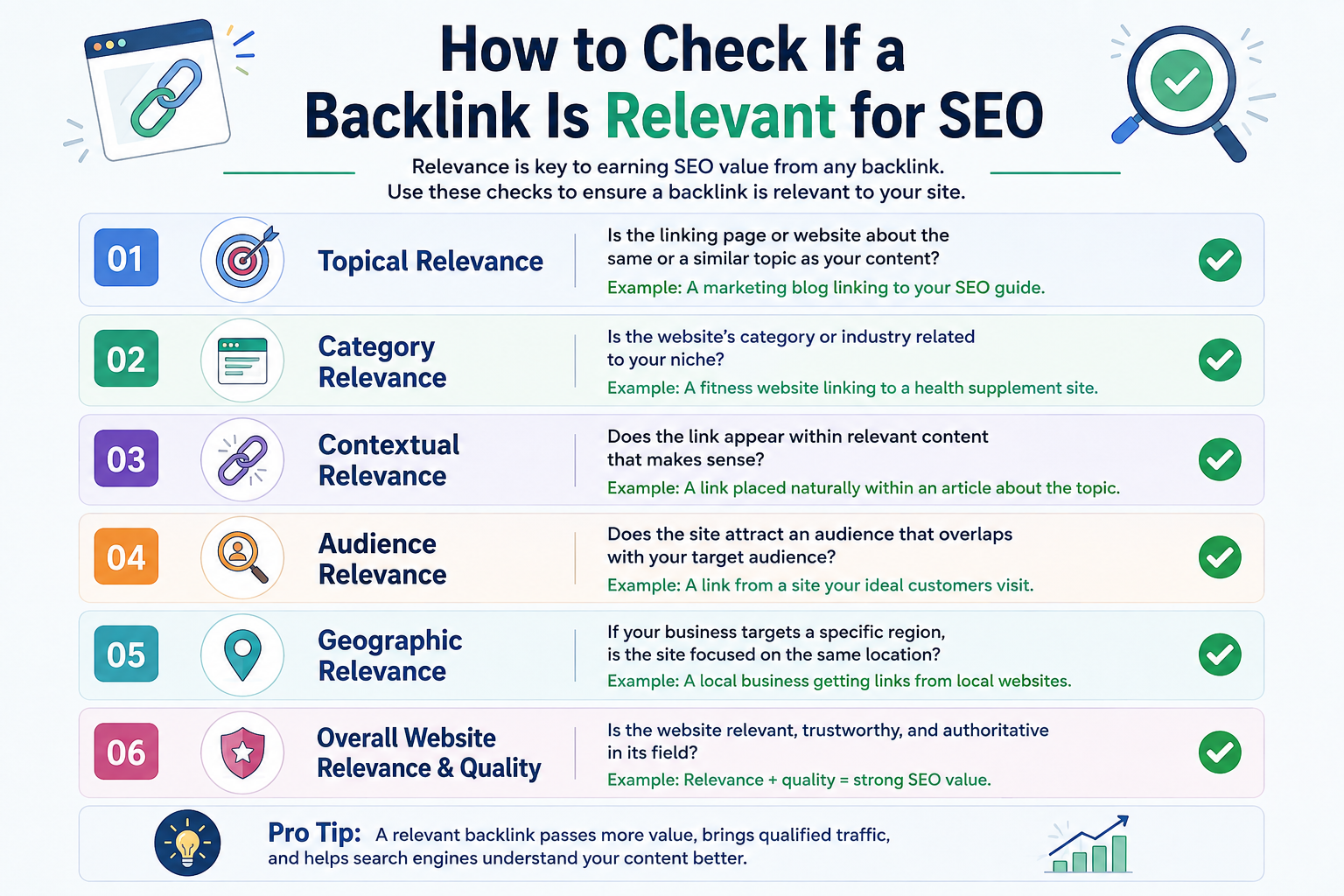
How to Check If a Backlink Is Relevant for SEO
Backlinks can help improve a website’s authority and search visibility, but not every backlink has the same value.
A link from a high-authority website may look impressive, but if the linking page has nothing to do with your topic, product, service, or audience, the link may be far less useful than expected.
That is why SEO professionals should learn how to check if a backlink is relevant before building, buying, exchanging, or accepting a link.
Backlink relevance helps you understand whether there is a natural relationship between the page giving the link and the page receiving it.
In this guide, you will learn what backlink relevance means, how to measure it, what makes a backlink relevant, and how to compare relevance with metrics such as Domain Rating, traffic, and domain authority.
What Is Backlink Relevance?
Backlink relevance describes how closely related a linking website or page is to the page receiving the backlink.
For example, imagine you own a website about cloud hosting.
A backlink from an article discussing:
- dedicated servers
- cloud infrastructure
- cybersecurity
- data centers
- website hosting
would usually be more relevant than a backlink from an article about wedding photography.
The closer the topical relationship is, the more naturally the link fits into the content.
A relevant backlink should make sense to both the reader and search engines.
Why Is Backlink Relevance Important?
Search engines do not evaluate backlinks only by counting how many links a website has.
The context surrounding those links also matters.
A backlink that appears naturally inside a relevant article can provide a clearer relationship between the source page and the destination page.
Relevance can also improve the quality of referral traffic.
If someone is already reading about cloud computing and clicks a link to a cloud hosting guide, there is a logical reason for that visitor to continue reading.
Compare that with a cloud hosting link inserted into an article about wedding venues.
The second link may technically exist, but there is little connection between the subjects.
This is why niche-relevant backlinks are generally more useful when building a natural backlink profile.
How to Check If a Backlink Is Relevant
You do not need to rely on one SEO metric.
Instead, evaluate several types of relevance together.
Here is a practical process for checking backlink relevance.
1. Check the Source Page Topic
Start with the exact page that will contain the backlink.
Ask:
What is this page actually about?
Do not judge the opportunity only by looking at the website homepage.
For example, a large technology website may cover:
- AI
- cybersecurity
- hosting
- business software
- SaaS
- networking
If your target page is about dedicated servers and the backlink comes from an article about server infrastructure, the individual page may be highly relevant.
This is known as page-level relevance.
In many cases, page relevance can be more useful than simply asking whether the whole domain belongs to exactly the same niche.
2. Compare the Source Page With the Target Page
Next, compare the topic of the linking page with the page receiving the backlink.
Ask whether someone reading the original article would reasonably want to visit your target page.
For example:
Source article: How Cloud Infrastructure Works
Target page: Dedicated Server Hosting Guide
This is a logical relationship.
Now compare:
Source article: Best Wedding Invitation Designs
Target page: Dedicated Server Hosting Guide
There is almost no natural relationship.
A simple topical comparison like this is one of the easiest ways to determine how relevant a backlink is.
3. Check Domain Relevance
Next, evaluate the overall website.
This is called domain relevance.
Suppose your website operates in SEO and digital marketing.
Relevant domains might cover:
- SEO
- content marketing
- link building
- digital marketing
- advertising
- SaaS
- website growth
- analytics
A general business publication may also be relevant if the individual article is strongly related to your topic.
Domain relevance does not mean both websites must be identical.
The important question is whether the websites belong to related industries or audiences.
Page Relevance vs Domain Relevance
One common mistake in link building is judging an opportunity only by domain relevance.
Consider this example.
A large business website publishes an article titled:
How Backlinks Help Improve Search Visibility
The website itself covers many business topics, but this specific page is directly related to SEO.
If the article links to an SEO resource, the page relevance may still be very strong.
Now imagine a dedicated SEO website publishes an article about office furniture.
A backlink from that article to an SEO tool would be less contextually relevant even though the overall domain is about SEO.
This is why you should evaluate both:
Domain relevance
and
Page relevance
rather than relying on only one.
4. Check the Surrounding Content
The paragraph containing the backlink should also make sense.
This is called contextual relevance.
For example:
Before starting outreach, SEO teams should evaluate domain history, organic traffic, spam signals, and backlink relevance.
A link to a backlink analysis tool would fit naturally in that sentence.
However, inserting the same link into an unrelated paragraph simply because the website has strong metrics would feel forced.
When checking contextual relevance, look at:
- the sentence containing the link
- the paragraph around the link
- the section heading
- the overall article topic
The closer these elements are to your destination page, the stronger the contextual relationship.
5. Check the Anchor Text
Anchor text is the clickable text used for a backlink.
Relevant anchor text can help users understand what they will find after clicking.
For example, if the destination is a guide about backlink quality, suitable anchors might include:
- backlink quality
- backlink relevance
- relevant backlinks
- link quality analysis
- checking backlink relevance
The anchor should fit naturally into the sentence.
Avoid forcing exact-match keywords into content where they do not make sense.
A natural contextual anchor is usually better than an awkward keyword inserted purely for SEO.
6. Check Audience Relevance
Another useful question is:
Would the audience of this website care about my page?
For example, someone reading a cybersecurity blog may also be interested in:
- cloud hosting
- VPS hosting
- server infrastructure
- data privacy
- networking
Those topics have overlapping audiences.
On the other hand, visitors reading a fashion blog may have little reason to visit a technical guide about data centers.
Audience relevance can help determine whether a backlink may generate real referral traffic rather than existing only for SEO purposes.
7. Check Search Intent
Search intent describes what someone is trying to accomplish when searching online.
Common intent types include:
- informational
- commercial
- transactional
- navigational
Ideally, the source and target pages should have compatible intent.
For example:
Source: How to Choose a Cloud Hosting Provider
Target: Best Cloud Hosting Options
These pages have closely related intent.
However:
Source: What Is Cloud Computing?
Target: Buy Payroll Software
The topics and user intent are completely different.
Checking intent is another simple way to measure backlink relevance for SEO.
What Makes a Backlink Relevant?
A backlink does not need to match your exact keyword.
Instead, look for a logical relationship between several elements.
A relevant backlink usually has:
- a related source-page topic
- a related target-page topic
- natural anchor text
- logical surrounding content
- similar audience interests
- compatible search intent
- reasonable domain relevance
You can think of backlink relevance as a combination of these signals rather than a single number.
Relevant Backlink Examples
Understanding real examples makes backlink relevance easier to evaluate.
Example 1: Highly Relevant
Source article: Best Dedicated Server Security Practices
Target page: Managed Dedicated Server Guide
Anchor: managed server hosting
This backlink has strong page, audience, and contextual relevance.
Example 2: Relevant
Source article: How Businesses Can Improve Website Performance
Target page: Website Hosting Guide
Anchor: reliable website hosting
The topics are not identical, but the relationship is natural.
Example 3: Partially Relevant
Source article: Best Business Software Tools
Target page: SEO Reporting Software
The source topic is broad, but the destination may still fit depending on the surrounding section.
Example 4: Irrelevant
Source article: Wedding Photography Tips
Target page: Cloud VPS Hosting
There is no clear relationship between the content or audience.
This would be considered a weak backlink opportunity from a relevance perspective.
Does a Backlink Need to Come From the Same Niche?
No.
A backlink does not always need to come from a website in exactly the same niche.
Related niches can still provide highly relevant links.
For example, an SEO agency could naturally receive backlinks from sites about:
- SaaS
- web development
- digital marketing
- eCommerce
- content marketing
- analytics
- WordPress
- business growth
These industries frequently overlap.
The key is topical connection.
A link should make sense within the article rather than being inserted purely because the website has strong metrics.
Is a High-DR Backlink Always Better?
Not necessarily.
SEO professionals often focus heavily on metrics such as:
- Domain Rating
- Domain Authority
- traffic
- referring domains
These metrics can be useful, but they should not replace relevance.
Consider these two opportunities.
Website A
- DR 80
- unrelated niche
- unrelated article
- forced anchor
- little audience overlap
Website B
- DR 45
- relevant niche
- highly relevant article
- natural anchor
- strong contextual connection
Website A has the higher authority metric.
But Website B may provide a much more natural backlink.
This is why backlink relevance vs domain authority should not be viewed as an either-or decision.
Good link building normally considers both.
How Relevant Should a Backlink Be?
There is no universal relevance score that every backlink must meet.
Instead, ask whether the relationship makes sense.
One useful approach is to classify links into three groups.
Highly Relevant
The website, article, section, anchor, and destination all discuss closely related topics.
Moderately Relevant
The broader website may cover several subjects, but the individual article and backlink context are relevant.
Weakly Relevant
There is little connection between the source content and destination page.
Whenever possible, prioritize the first two categories.
How to Measure Backlink Relevance
You can manually evaluate relevance using a simple checklist.
Ask these questions:
- Is the source article related to the destination page?
- Is the source website related to my industry?
- Does the anchor text make sense?
- Does the surrounding paragraph support the link?
- Would the website’s audience care about my page?
- Does the backlink look editorially natural?
- Does the destination provide useful information related to the source article?
If most answers are yes, the backlink likely has good relevance.
For faster analysis, you can also use RAAS Digital’s Backlink Relevancy Score Checker.
[INTERNAL LINK: Backlink Relevancy Score Checker → RAAS Digital Tools page]
A relevance checker can help compare multiple SEO signals before you spend time contacting a website.
What Else Should You Check Besides Backlink Relevance?
Relevance is important, but it should not be the only factor.
After finding a relevant opportunity, check several additional signals.
Organic Traffic
A website with genuine organic visibility can be more valuable than a site that exists only to publish paid links.
Look for consistent traffic patterns rather than one unusually high number.
Domain History
Check how long the domain has existed and whether its previous content matches the current website.
You can use a Domain Age & Info Checker as an initial research step.
[INTERNAL LINK: Domain Age & Info Checker → RAAS Digital Tools page]
Spam Signals
Review the website for suspicious patterns such as:
- excessive unrelated outbound links
- large numbers of sponsored posts
- casino links on unrelated sites
- unnatural anchors
- thin content
- sudden niche changes
RAAS Digital’s Spam Score Checker can help as part of this process.
[INTERNAL LINK: Spam Score Checker → RAAS Digital Tools page]
Website Industry
Understanding the actual niche of a website can help determine domain-level relevance.
A Website Industry Finder can be useful when reviewing large prospect lists.
[INTERNAL LINK: Website Industry Finder → RAAS Digital Tools page]
Anchor Text Quality
The anchor should sound natural and describe the destination accurately.
Avoid repeatedly using the exact same anchor across many backlinks.
You can use an Anchor Text Generator to develop more natural variations.
[INTERNAL LINK: Anchor Text Generator → RAAS Digital Tools page]
A Simple Backlink Quality Checklist
Before accepting or building a backlink, review the following:
- Is the source page relevant?
- Is the target page relevant?
- Is the domain reasonably related?
- Does the paragraph naturally support the link?
- Is the anchor natural?
- Does the site have real traffic?
- Does the website publish useful content?
- Does its historical niche look legitimate?
- Are there obvious spam signals?
- Would a real reader reasonably click the link?
This process gives you a much better picture than simply checking DR or DA.
Backlink Relevance vs Backlink Authority
Backlink authority and backlink relevance measure different things.
Authority attempts to estimate the overall strength of a website or backlink profile.
Relevance evaluates how closely connected the linking content is to your destination.
A strong backlink often combines both.
However, when choosing between an unrelated high-authority link and a natural, relevant link from a legitimate website, relevance should not be ignored.
The strongest SEO strategies usually focus on backlinks that make sense editorially rather than links chosen only because of a metric.
Common Backlink Relevance Mistakes
SEO teams often make several mistakes when selecting backlink prospects.
Choosing Websites Only by DR
High DR does not automatically mean high relevance.
Ignoring the Exact Article
Always inspect the source page, not only the domain.
Forcing Exact-Match Anchors
The anchor should fit naturally within the sentence.
Accepting Any Site With Traffic
Traffic is useful, but the site’s topic and audience still matter.
Ignoring Historical Content
An old domain may have previously hosted unrelated or low-quality content.
Buying Links Without Reviewing Context
Always review where the link will appear before making a decision.
Frequently Asked Questions
What is a relevant backlink?
A relevant backlink comes from a website, page, or content section that has a logical topical relationship with the destination page.
How do I know if a backlink is relevant?
Compare the source article, destination page, anchor text, surrounding paragraph, audience, niche, and search intent.
Does backlink relevance matter for SEO?
Yes. Relevance helps create a natural relationship between the linking content and destination page and can also increase the chances of receiving useful referral traffic.
Does a backlink need to come from the same niche?
No. Closely related niches can still provide strong backlinks when the source article and target page have a logical connection.
Is page relevance more important than domain relevance?
Both matter. However, a highly relevant individual page on a broad website may still provide a strong contextual backlink.
Are high-DR backlinks always better?
No. A high-DR backlink from an unrelated article may be less attractive than a relevant backlink from a legitimate website with moderate authority.
What is contextual relevance in link building?
Contextual relevance refers to how naturally a backlink fits within the sentence, paragraph, section, and overall article.
How can I measure backlink relevance?
Review topical similarity, audience overlap, page context, anchor text, search intent, and domain niche. You can also use a backlink relevance checker to speed up prospect analysis.
Final Thoughts
Learning how to check if a backlink is relevant can help you make better link-building decisions.
Do not evaluate links only by DR, DA, traffic, or domain age.
Instead, look at the complete context.
A good backlink should connect two pages in a way that makes sense to a real reader.
Start by checking:
- page relevance
- domain relevance
- contextual relevance
- anchor text
- audience
- search intent
- traffic
- domain history
- spam signals
When these factors align, you have a much stronger backlink opportunity.
For a faster first evaluation, use RAAS Digital’s Backlink Relevancy Score Checker to analyze whether a potential link placement fits your target page before adding it to your outreach campaign.