
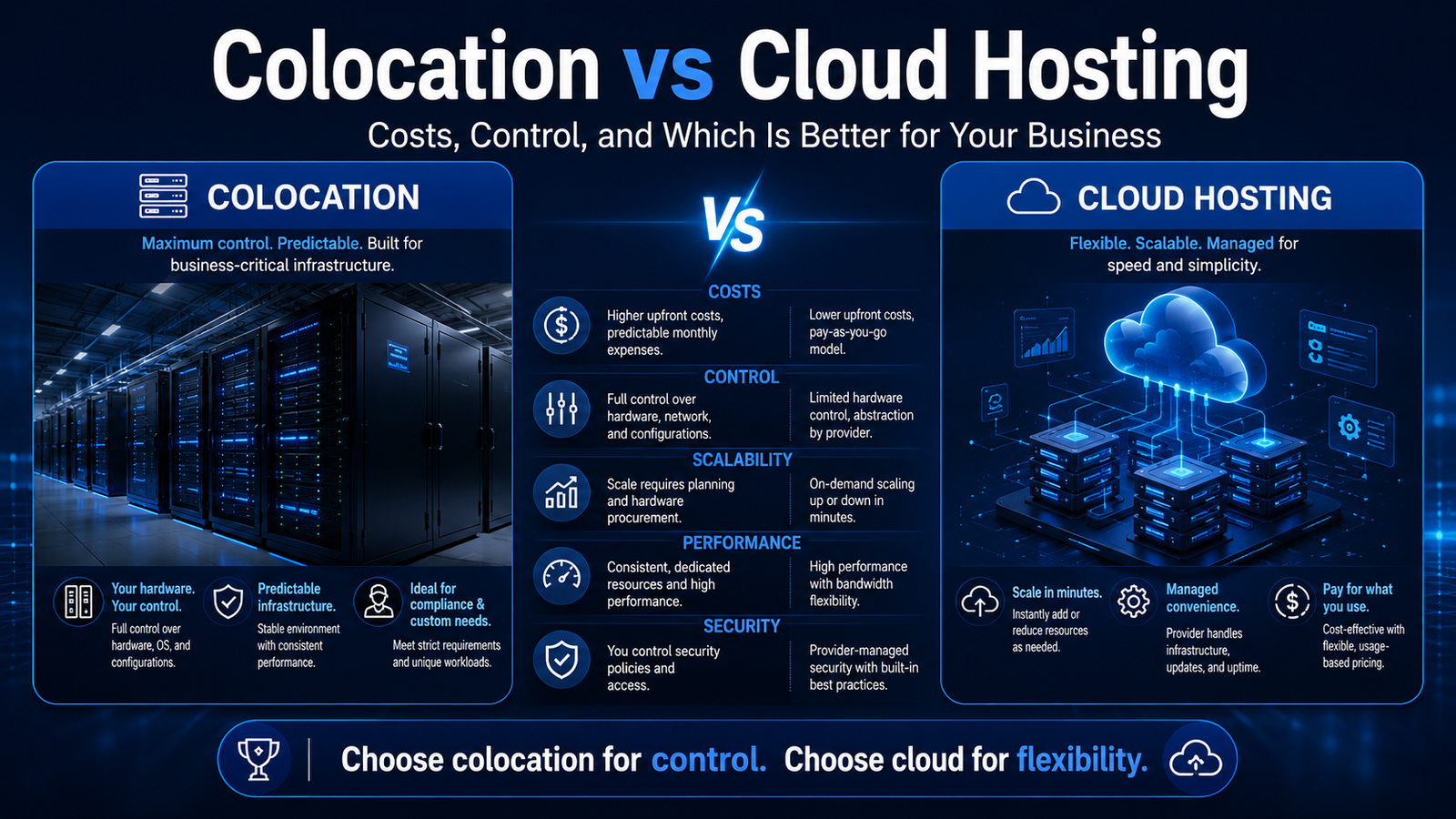
Colocation vs Cloud Hosting: Costs, Control, and Which Is Better for Your Business?
A growing business eventually has to decide where its applications, databases, files, and critical IT systems should run.
For many companies, the choice comes down to two infrastructure models:
- Place company-owned hardware inside a professional colocation data center.
- Rent virtual computing resources from a public or private cloud provider.
Both options remove the need to build and operate an entire private data center. However, they differ significantly in ownership, pricing, scalability, control, management, and long-term financial structure.
Cloud hosting is generally easier to start. A company can launch virtual machines, databases, and storage without buying physical servers.
Colocation requires more planning and capital because the customer owns or leases the hardware. In return, the business receives greater control over its physical infrastructure, network design, performance profile, and equipment lifecycle.
The right choice depends on the workload—not on which model is more modern or receives more attention.
This guide compares colocation vs cloud hosting for growing businesses and explains when each model makes commercial and technical sense.
Colocation vs Cloud Hosting: Quick Answer
Choose cloud hosting when your business needs:
- Fast deployment
- Flexible resource scaling
- Minimal hardware management
- Low initial capital expense
- Temporary or unpredictable workloads
- Access to managed cloud services
- Multiple regions without deploying physical equipment
Choose colocation when your business needs:
- Control over physical servers and network equipment
- Predictable resource availability
- Specialized hardware
- High sustained compute or storage usage
- Long-term infrastructure cost control
- Custom network design
- Direct carrier and peering relationships
- A clearly defined physical deployment location
Choose a hybrid model when some workloads need cloud flexibility while others require dedicated hardware, predictable performance, or specialized network connectivity.
Colocation vs Cloud: Side-by-Side Comparison
| Factor | Colocation | Cloud hosting |
| Hardware ownership | Customer owns or leases equipment | Cloud provider owns equipment |
| Initial cost | Higher | Lower |
| Monthly pricing | Space, power, cooling, ports, bandwidth and support | Compute, storage, traffic, requests and managed services |
| Deployment speed | Days or weeks | Minutes or hours |
| Physical control | High | Very limited |
| Scalability | Requires hardware planning | Resources can often scale rapidly |
| Performance | Predictable when properly designed | Depends on instance type and architecture |
| Custom hardware | Supported | Limited to provider offerings |
| Management | Customer manages hardware and systems | Provider manages physical infrastructure |
| Data-center operations | Colocation provider | Cloud provider |
| Network carrier choice | Broad in carrier-neutral facilities | Provider-controlled |
| Capital expense | Higher | Usually lower |
| Operating expense | More predictable for stable deployments | Usage dependent |
| Best for | Stable, specialized and high-utilization workloads | Variable, rapidly changing and managed workloads |
What Is Colocation?
Colocation is an infrastructure service in which a company places its own servers, storage systems, and networking equipment inside a third-party data center.
The colocation provider normally supplies:
- Rack or cabinet space
- Electrical power
- Cooling
- Physical security
- Network connectivity
- Fire detection and suppression
- Environmental monitoring
- Facility maintenance
- On-site operational support
The customer continues to own and control the computing equipment.
Equinix defines colocation as placing an organization’s own servers and other essential computing hardware inside rented space in a physical data center operated by a third party.
Common colocation footprints
A business may rent:
- One or more rack units
- A quarter cabinet
- A half cabinet
- A full cabinet
- Several cabinets
- A secured cage
- A private suite
- Custom high-density space
Smaller footprints can help managed service providers, network operators, and growing technology companies enter a professional data center without immediately committing to a large deployment.
Who owns what in colocation?
The customer generally owns and manages:
- Servers
- Storage
- Switches
- Routers
- Firewalls
- Operating systems
- Applications
- Databases
- Hardware lifecycle
- Software updates
The colocation provider generally manages:
- The building
- Power systems
- Cooling systems
- Physical access
- Fire protection
- Environmental controls
- Facility monitoring
- Carrier access
- Meet-me rooms
- On-site assistance where contracted
Exact responsibilities vary by provider and contract.
What Is Cloud Hosting?
Cloud hosting provides on-demand access to computing resources owned and operated by a cloud provider.
These resources can include:
- Virtual machines
- Managed databases
- Object storage
- Block storage
- Load balancers
- Containers
- Serverless computing
- Content delivery
- Networking
- Security services
- Analytics
- Artificial intelligence services
NIST defines cloud computing as convenient, on-demand network access to a shared pool of configurable resources that can be rapidly provisioned and released with limited management effort. Its core characteristics include on-demand self-service, resource pooling, rapid elasticity, broad network access, and measured service.
The cloud customer does not normally purchase or physically manage the underlying servers.
The Main Difference: Ownership and Responsibility
The most important distinction between colocation and cloud hosting is not the data-center building. Both services ultimately operate from physical data centers.
The difference is who owns and controls the hardware.
In colocation
Your business owns or leases the servers and networking equipment.
You select:
- Server models
- Processors
- Memory
- Storage
- Network cards
- Firewalls
- Hypervisors
- Operating systems
- Replacement schedules
In cloud hosting
The cloud provider owns the servers and exposes configurable virtual resources.
You select from the provider’s available:
- Instance types
- Storage products
- Network options
- Regions
- Managed services
- Pricing models
Cloud reduces the burden of purchasing and maintaining physical equipment, but it also limits direct hardware control.
1. Cost: Colocation vs Cloud Hosting
Neither model is automatically cheaper.
Cloud hosting generally has a lower initial cost, while colocation can provide better long-term economics for stable, heavily utilized workloads.
The correct comparison should cover at least three to five years.
Colocation cost components
A colocation budget may include:
- Server hardware
- Storage appliances
- Network switches
- Firewalls
- Shipping
- Installation
- Rack or cabinet rental
- Power allocation
- Metered electricity
- Cross-connects
- Internet transit
- Peering ports
- Remote hands
- Hardware warranties
- Spare components
- Equipment replacement
- Backup services
- Insurance
- Staff travel
- Migration costs
Colocation pricing is usually quote based because the facility must understand the deployment’s:
- Rack size
- Power draw
- Cooling density
- Connectivity
- Carrier requirements
- Contract period
- Support requirements
- Security and compliance requirements
Cloud cost components
A cloud bill may include:
- Virtual machine runtime
- CPU and memory
- Managed disks
- Object storage
- Snapshots
- Databases
- Load balancers
- Public IP addresses
- Data transfer
- Egress
- API requests
- Monitoring
- Logging
- Backup retention
- Technical support
- Managed security products
- Premium operating-system licenses
AWS On-Demand Instances are billed by the hour or second without long-term commitments, which converts large hardware purchases into variable operating costs. Additional services such as storage and data transfer are billed separately.
Microsoft similarly separates Linux virtual-machine compute pricing from storage, support, networking, and other services.
Why cloud costs become difficult to forecast
Cloud cost can change when:
- Traffic grows
- More data leaves the platform
- Logs accumulate
- Snapshots are retained
- Applications use more managed services
- Databases scale
- Teams leave unused resources running
- Development environments are not shut down
- Regional architecture expands
- Public IP usage increases
Cloud platforms offer detailed pricing tools, but a growing architecture may contain hundreds of billable components.
Why colocation costs become difficult to forecast
Colocation costs can change when:
- Power consumption increases
- Equipment reaches end of life
- Additional cabinets are required
- Connectivity expands
- Hardware fails
- Remote hands are needed
- Staff must visit the facility
- Spare parts are unavailable
- A new network carrier is added
- Power density exceeds the original reservation
Colocation provides clearer physical-resource boundaries, but the company assumes hardware risk.
A simple three-year cost framework
Calculate:
Colocation TCO
Hardware + shipping + installation + cabinet fees + power + connectivity + support + maintenance + replacement reserve + staff cost
Cloud TCO
Compute + storage + databases + bandwidth + egress + backups + monitoring + support + licenses + engineering cost
Do not compare only the cloud VM price with the colocation cabinet fee.
Both sides must include all associated infrastructure and personnel costs.
2. Scalability
Cloud hosting is generally easier to scale quickly.
A company can often add:
- Virtual machines
- Storage
- Databases
- Containers
- New geographic regions
- Load-balancing capacity
without waiting for physical hardware delivery.
NIST identifies rapid elasticity as one of cloud computing’s defining characteristics.
Cloud scalability advantages
Cloud is useful when:
- Demand is unpredictable.
- A new application is being tested.
- Seasonal traffic changes sharply.
- Development teams launch frequently.
- Temporary capacity is required.
- Global expansion must happen quickly.
- The workload can be designed for distributed infrastructure.
Colocation scalability
Colocation can scale, but physical planning is required.
Expansion may involve:
- Purchasing servers
- Reserving more power
- Adding cabinets
- Ordering circuits
- Installing switches
- Shipping equipment
- Scheduling engineering work
This makes colocation slower for sudden expansion.
However, colocation can be very efficient when growth is predictable. A company can reserve capacity and deploy equipment in planned stages.
Scalability verdict
Cloud wins for immediate elasticity.
Colocation can win for predictable, sustained growth where hardware utilization remains high.
3. Performance and Resource Consistency
Colocation provides direct control over hardware.
The company can select:
- High-frequency processors
- Large memory configurations
- GPU systems
- NVMe storage
- Custom network adapters
- Specialized accelerators
- Low-latency switching
- Storage architectures
This is valuable when performance must remain consistent.
Cloud performance
Cloud providers offer many instance families and specialized products. However, customers choose from predefined configurations rather than building arbitrary hardware.
Cloud is strong for:
- Standard web applications
- Distributed systems
- Short-lived computing
- Development
- Managed databases
- Variable workloads
- Applications designed for horizontal scaling
Colocation performance
Colocation is strong for:
- High sustained CPU use
- Dense storage
- GPU clusters
- Large databases
- Streaming infrastructure
- Content-delivery nodes
- Network appliances
- Hyperconverged platforms
- Low-latency systems
- Custom hardware
DFDC’s current colocation specification, for example, supports sealed cold-aisle deployments up to 20 kW per cabinet and identifies high-density cabinets as suitable for dense compute and GPU environments.
Performance verdict
Choose cloud when flexible access to standardized resources is more important than hardware control.
Choose colocation when sustained performance, specialized equipment, and predictable resource availability are essential.
4. Control and Customization
Colocation provides the highest level of control without constructing a private data center.
The customer controls:
- Hardware
- Firmware
- Hypervisor
- Network design
- Storage
- Operating systems
- Security appliances
- Equipment replacement
- Physical asset ownership
Cloud customers control applications, data, permissions, and virtual infrastructure within the limits of the provider’s platform.
When physical control matters
Colocation may be preferable when:
- Proprietary hardware is required.
- A company uses specialized network appliances.
- Hardware certification is necessary.
- A custom storage platform is deployed.
- The business wants to retain infrastructure assets.
- Existing servers still have a useful operational life.
- Partners require specific hardware configurations.
- The workload cannot be moved easily to virtual infrastructure.
Control verdict
Colocation provides greater physical and network control.
Cloud reduces management responsibilities but requires greater dependence on the provider’s platform.
5. Security and Compliance
Neither cloud nor colocation is automatically more secure.
Security depends on architecture, configuration, processes, access controls, monitoring, and staff expertise.
Security in colocation
The provider is generally responsible for facility security, including:
- Perimeter protection
- Building access
- Cameras
- Environmental monitoring
- Fire protection
- Power systems
- Cooling systems
The customer is responsible for:
- Server security
- Network security
- Operating systems
- Applications
- Encryption
- User access
- Monitoring
- Vulnerability management
- Data protection
Security in the cloud
The cloud provider manages:
- Buildings
- Physical hardware
- Core platform infrastructure
- Some managed-service layers
The customer remains responsible for areas such as:
- Identities
- Access permissions
- Data
- Applications
- Network policies
- Configuration
- Secrets
- Endpoint security
The exact shared-responsibility boundary changes by cloud service.
Compliance considerations
Evaluate:
- Data location
- Physical access records
- Security certifications
- Audit reports
- Encryption
- Backup location
- Incident notification
- Access logging
- Subprocessors
- Data deletion
- Business continuity
- Contractual obligations
Do not assume a provider’s certification automatically makes your application compliant. Your architecture and operational processes remain part of the compliance scope.
6. Carrier Neutrality and Connectivity
Network connectivity is one of colocation’s most important commercial factors.
A carrier-neutral data center allows customers to choose among multiple network and telecommunications providers rather than being restricted to one facility-owned carrier.
This can improve:
- Route diversity
- Contract flexibility
- Redundancy
- Negotiating power
- Cloud connectivity
- Peering access
- Disaster recovery
- Network design
Carrier-neutral facilities let customers select connectivity according to their technical and commercial requirements.
Why carrier choice matters
A business may need:
- One carrier for internet transit
- Another for private WAN connectivity
- A third for dark fiber
- Direct peering
- Cloud on-ramps
- Diverse physical routes
- Backup connectivity
A facility tied to one carrier can create network lock-in.
Natural DFDC placement
U.S. technology companies deploying infrastructure in the Netherlands should evaluate carrier availability, route diversity, peering, power design, remote support, and expansion capacity before choosing a carrier-neutral colocation facility.
DFDC’s THG1 facility in The Hague allows customers to select their carrier and contract structure. Its current specifications include distributed 2N+1 power, sealed cold-aisle cooling, 24/7 NOC access, and carrier-neutral connectivity.
7. Management and Staffing Requirements
Cloud hosting reduces physical infrastructure management.
The cloud provider handles:
- Physical server replacement
- Facility power
- Cooling
- Rack installation
- Hardware inventory
- Physical networking
- Data-center access
The customer still needs cloud engineers to manage architecture, access, cost, security, deployment, and reliability.
Colocation management
A colocation customer must manage its equipment.
This may involve:
- Hardware installation
- Cabling
- Firmware updates
- Component replacement
- Inventory
- Spare parts
- Capacity planning
- Shipping
- Equipment disposal
Businesses can reduce on-site work through remote-hands or managed-colocation services.
Remote hands
Remote-hands technicians may perform tasks such as:
- Power cycling equipment
- Replacing drives
- Checking status lights
- Connecting cables
- Installing hardware
- Taking photographs
- Reading console output
- Assisting with emergency troubleshooting
Before signing a contract, check:
- Availability
- Hourly cost
- Minimum billing
- Response targets
- Technician qualifications
- Emergency rates
- Included services
- Authorization procedure
Management verdict
Choose cloud when the business wants to minimize physical infrastructure work.
Choose colocation when the business has hardware expertise or can contract the necessary operational support.
8. Availability and Business Continuity
Both cloud and colocation can support highly available systems, but neither guarantees continuity without proper architecture.
Cloud availability
Cloud applications can use:
- Multiple availability zones
- Load balancers
- Auto scaling
- Replicated databases
- Multiple regions
- Managed backups
However, the customer must design and pay for this redundancy.
Colocation availability
Colocation facilities may provide:
- Redundant utility feeds
- UPS systems
- Generators
- A+B power feeds
- Redundant cooling
- Multiple network carriers
- Diverse fiber entrances
- On-site engineering
Data-center Tier standards are widely used to classify infrastructure topology and expected resilience, but a business should verify actual certification rather than relying on informal “Tier-like” marketing language. Uptime Institute describes its Tier system as an international standard for data-center performance.
Questions to ask
- Is power delivered through diverse A+B feeds?
- How many generators and UPS systems are installed?
- How is maintenance performed?
- Are carrier paths physically diverse?
- Is remote support available 24/7?
- What does the SLA cover?
- Are service credits automatic?
- What is excluded from uptime calculations?
- How are incidents communicated?
- Can infrastructure be duplicated at another location?
9. Data Egress and Network Costs
Data transfer is often one of the most important differences between cloud and colocation economics.
Cloud egress
Cloud providers commonly charge when data leaves their network or moves between certain regions and services.
Costs can grow for:
- Video streaming
- Large downloads
- Backups
- Data replication
- Content distribution
- Analytics exports
- Multi-cloud traffic
- Migration
- Database transfers
Cloud cost forecasts should model expected outbound traffic—not only compute.
Colocation bandwidth
Colocation customers may purchase:
- Committed internet transit
- Burstable bandwidth
- Cross-connects
- Peering
- Dark fiber
- Wavelength services
- Private network links
For predictable, high-volume traffic, contracted connectivity may be easier to forecast than usage-based cloud egress.
Network-cost verdict
Cloud can be economical for applications with modest or unpredictable traffic.
Colocation may offer better economics for workloads with sustained, high-volume network usage—provided the carrier and peering strategy is designed correctly.
10. Data Location and European Expansion
A U.S. company may need European infrastructure for:
- Lower latency to European customers
- Regional disaster recovery
- Data-location requirements
- European SaaS deployments
- Content delivery
- Network interconnection
- Local cloud or IaaS services
- Acquired European operations
The Netherlands is an established European connectivity market, and The Hague can provide an alternative regional deployment location outside Amsterdam’s most concentrated infrastructure zones.
Questions for U.S. businesses
Before placing infrastructure in Europe, ask:
- Which countries generate the traffic?
- Does the application require local data storage?
- How will U.S. engineers access the equipment?
- Is 24/7 remote hands available?
- Which carriers are present?
- Is local peering included?
- How quickly can replacement hardware arrive?
- Are contracts denominated in euros or dollars?
- Which taxes apply?
- What compliance evidence is available?
- Can the site support a second regional deployment?
A European colocation deployment should be chosen for business, performance, continuity, or governance reasons—not merely because a European IP address sounds valuable.
Colocation vs Cloud Hosting Costs: Which Is Cheaper?
Cloud is often cheaper when:
- The company is launching a new product.
- Demand is uncertain.
- Workloads run intermittently.
- Infrastructure changes frequently.
- Managed services replace internal engineering.
- Hardware ownership is undesirable.
- The business needs several regions quickly.
Colocation may be cheaper when:
- Workloads run continuously.
- Hardware utilization is consistently high.
- Data transfer is substantial.
- The company already owns suitable equipment.
- Specialized hardware is required.
- Server life can be spread across several years.
- Power and bandwidth are contracted predictably.
- The business has infrastructure staff.
Avoid false comparisons
Do not compare:
- One cloud VM with an entire colocation rack
- Cloud compute alone with a fully connected cabinet
- Hardware purchase price with one month of cloud usage
- Introductory cloud credits with long-term costs
- Colocation space without power and connectivity
- Cloud infrastructure without engineering and support
Build a workload-specific model.
Colocation vs Cloud for Small Businesses
Cloud hosting is usually the better starting point for small businesses.
Many small companies do not have:
- Hardware engineers
- Network specialists
- Spare equipment
- Procurement capacity
- A large capital budget
- Predictable infrastructure demand
Cloud services allow them to launch without purchasing servers.
When a small business might use colocation
Colocation may make sense when the company:
- Is a managed service provider
- Operates network equipment
- Owns several servers
- Provides hosting services
- Runs a regional ISP
- Has consistent high-volume workloads
- Requires specialized hardware
- Needs a disaster-recovery location
- Has outgrown an office server room
A quarter or half cabinet can provide a smaller entry point than a full rack.
Colocation vs Cloud for SaaS Companies
A young SaaS company will usually begin in the cloud because it needs:
- Fast deployment
- Easy scaling
- Managed databases
- Development environments
- Global regions
- Low initial capital expense
As the company grows, some workloads may move to colocation.
Examples include:
- Stable database clusters
- High-volume storage
- GPU infrastructure
- Content delivery
- Large sustained compute
- Network-intensive services
- Private-cloud systems
The business does not have to move everything. A hybrid architecture can keep elastic application layers in the cloud while placing stable infrastructure in colocation.
Colocation vs Cloud for Managed Service Providers
Managed service providers may prefer colocation when they need:
- Customer hardware isolation
- Predictable rack costs
- Direct network access
- Private-cloud platforms
- Firewall appliances
- Backup infrastructure
- Multi-tenant virtualization
- Carrier choice
- Remote-hands support
Cloud remains useful for:
- SaaS management platforms
- Temporary workloads
- Off-site backups
- Development
- Global service extensions
- Disaster recovery
Colocation vs Cloud for AI and GPU Workloads
GPU workloads create specific infrastructure requirements.
Consider:
- Power density
- Cooling capacity
- Hardware availability
- Network throughput
- Storage speed
- Cluster size
- Utilization
- Deployment duration
Cloud GPUs are attractive for short-term experiments and variable demand.
Colocated GPUs may be commercially attractive when expensive hardware remains highly utilized for extended periods.
The decision should include:
- GPU purchase price
- Expected utilization
- Electricity
- Cabinet density
- Cooling
- Network cost
- Hardware maintenance
- Cloud reservation discounts
- Deployment life
High-density deployments should be approved by the data center before equipment is purchased.
When to Choose Cloud Hosting
Cloud is usually the better option when:
- The application is new.
- Demand is unpredictable.
- The business needs fast deployment.
- Hardware ownership is undesirable.
- Managed databases and services reduce development time.
- The team is distributed.
- Multi-region deployment is required immediately.
- Workloads are temporary.
- Capital is limited.
- The company lacks hardware expertise.
When to Choose Colocation
Colocation is usually the better option when:
- The company owns valuable hardware.
- Workloads operate continuously.
- Hardware configurations are specialized.
- Resource requirements are predictable.
- Physical control is necessary.
- Network carrier choice matters.
- Egress volume is high.
- Equipment will be used for several years.
- The company has infrastructure expertise.
- A regional data-center presence is strategically valuable.
When to Use a Hybrid Model
Many businesses should not choose only one model.
A hybrid strategy can use:
- Cloud for customer-facing application scaling
- Colocation for databases
- Cloud for development
- Colocation for backups
- Cloud for managed services
- Colocation for private infrastructure
- Cloud for temporary GPU demand
- Colocation for sustained GPU clusters
- Colocation as a network hub
- Cloud for global distribution
Example hybrid architecture
A SaaS company might use:
- Public cloud for web applications
- Managed cloud databases for new products
- Colocated storage for long-term data
- Private connectivity between cloud and colocation
- Colocation for backup and recovery
- CDN services for public content
The hybrid model adds flexibility but also increases architectural and operational complexity.
Colocation Buyer’s Checklist
Facility
- Location
- Flood and environmental risk
- Building ownership
- Expansion capacity
- Loading access
- Equipment staging areas
- Physical security
- Fire suppression
- Certification evidence
Power
- A+B feeds
- UPS design
- Generator design
- Fuel contracts
- Maintenance procedures
- Metering
- Maximum cabinet density
- Power reservation
- Overage pricing
Cooling
- Cooling architecture
- Redundancy
- Supported cabinet density
- Hot- or cold-aisle containment
- Environmental monitoring
- High-density support
- Humidity management
Connectivity
- Carrier neutrality
- In-building carriers
- Cross-connect pricing
- Installation time
- Internet exchanges
- Peering
- Transit
- Dark fiber
- Cloud connectivity
- Diverse fiber entrances
- Remote data-center connections
Operations
- 24/7 NOC
- Remote hands
- Response targets
- Emergency escalation
- Spare-part storage
- Equipment receiving
- Installation services
- Hardware disposal
Commercial terms
- Contract length
- Setup charges
- Cabinet fee
- Power pricing
- Cross-connect fees
- Remote-hands rates
- Bandwidth pricing
- Expansion terms
- SLA credits
- Renewal rules
- Exit assistance
Compliance
- ISO certifications
- SOC reports
- Physical access records
- Visitor controls
- Audit support
- Data-processing terms
- Incident notification
- Subcontractors
Cloud Hosting Buyer’s Checklist
- Regions and availability zones
- Compute pricing
- Storage pricing
- Egress pricing
- Public IP charges
- Support plans
- Managed-service costs
- Backup retention
- Database pricing
- Logging costs
- Monitoring
- Reservation terms
- Spot interruption rules
- Cost alerts
- Identity management
- Data residency
- Exit and migration costs
- Architecture portability
Common Mistakes to Avoid
Choosing cloud only because it has no hardware purchase
Low upfront cost does not guarantee low long-term cost.
Choosing colocation only because the monthly rack price looks cheaper
Hardware, support, power, network connectivity, and replacement costs must be included.
Ignoring data egress
Network-heavy cloud applications can produce significant transfer costs.
Underestimating operational labor
Colocation requires people who can manage hardware and networking.
Overbuying hardware
Physical equipment should be sized for realistic growth.
Ignoring carrier neutrality
Limited carrier choice can create dependency and reduce negotiating flexibility.
Treating certifications as a complete security solution
The customer remains responsible for its systems and applications.
Moving every workload at once
Cloud-to-colocation migrations should be tested in phases.
Forgetting disaster recovery
One reliable facility is not the same as a complete business-continuity strategy.
A Five-Step Decision Framework
Step 1: Classify the workload
Determine whether demand is:
- Predictable
- Variable
- Continuous
- Temporary
- Latency sensitive
- Network intensive
- Storage intensive
- Hardware specific
Step 2: Measure current usage
Record:
- CPU utilization
- Memory
- Storage
- Data transfer
- Egress
- Database size
- Backup volume
- Growth rate
- Availability requirements
Step 3: Build three-year and five-year models
Compare full costs, including staff and migration.
Step 4: Evaluate operational capability
Identify who will manage:
- Hardware
- Networking
- Security
- Backups
- Monitoring
- Incident response
- Vendor relationships
Step 5: Test a pilot
Move one noncritical workload or deploy a small colocation footprint before committing the entire platform.
Final Verdict
There is no universal winner in the colocation vs cloud hosting comparison.
Cloud hosting is usually better for:
- New applications
- Unpredictable demand
- Rapid deployment
- Low initial capital expense
- Managed services
- Temporary workloads
Colocation is usually better for:
- Stable 24/7 workloads
- Specialized hardware
- High sustained utilization
- Predictable resource needs
- Direct network control
- Long-term hardware ownership
- High-volume data transfer
For many growing businesses, the strongest answer is hybrid infrastructure.
Use the cloud where flexibility and managed services create value. Use colocation where control, performance consistency, network choice, and long-term economics justify physical equipment.
Before selecting either option, compare total cost, staffing, security, connectivity, availability, compliance, and migration risk—not simply the advertised monthly price.
Frequently Asked Questions
What is the difference between colocation and cloud hosting?
With colocation, the customer owns or leases the physical servers and places them in a third-party data center. With cloud hosting, the provider owns the hardware and sells virtual computing resources.
Is colocation cheaper than cloud hosting?
It can be cheaper for stable, highly utilized workloads over several years. Cloud is often cheaper for new, temporary, or unpredictable workloads. The answer depends on total cost of ownership.
Is cloud hosting better for small businesses?
Cloud hosting is generally easier for small businesses because it requires less upfront investment and hardware expertise.
When should a business move from cloud to colocation?
Consider colocation when cloud costs become consistently high, workloads are predictable, hardware utilization is strong, specialized equipment is needed, or the business requires greater network and physical control.
Does colocation include servers?
Usually not. The customer normally supplies the servers, while the provider supplies rack space, power, cooling, physical security, and connectivity.
What is carrier-neutral colocation?
Carrier-neutral colocation allows customers to choose among multiple network providers rather than being restricted to one carrier.
What are remote hands?
Remote hands are on-site technicians who perform approved physical tasks such as checking equipment, replacing components, connecting cables, or power cycling servers.
Can colocation and cloud be used together?
Yes. Hybrid infrastructure combines cloud services with colocated hardware and is common for businesses with different workload requirements.
Is colocation more secure than cloud?
Neither is automatically more secure. Colocation provides more physical control, while cloud providers manage more infrastructure layers. Security depends on architecture, access, configuration, monitoring, and operations.
How much does colocation cost?
Pricing depends on cabinet space, power, cooling density, connectivity, location, contract length, support, and compliance requirements. Most providers prepare customized quotes.
Is colocation suitable for U.S. companies expanding into Europe?
Yes, particularly when the company needs lower European latency, regional infrastructure, network interconnection, disaster recovery, or local operational presence.
What should I ask a colocation provider?
Ask about power design, cooling, cabinet density, carriers, peering, cross-connects, remote hands, uptime SLAs, security, certifications, expansion, pricing, and contract terms.